EN DE
WHATTO
buy. plan. organise.

Cleaning schedule for shared homes

Who cleans what, and when? WhatTo helps your household divide chores fairly, track contributions and keep the peace. 14-day free trial included.

Start free — 14-day trial

Free & no credit card needed. 14 days of Premium included.
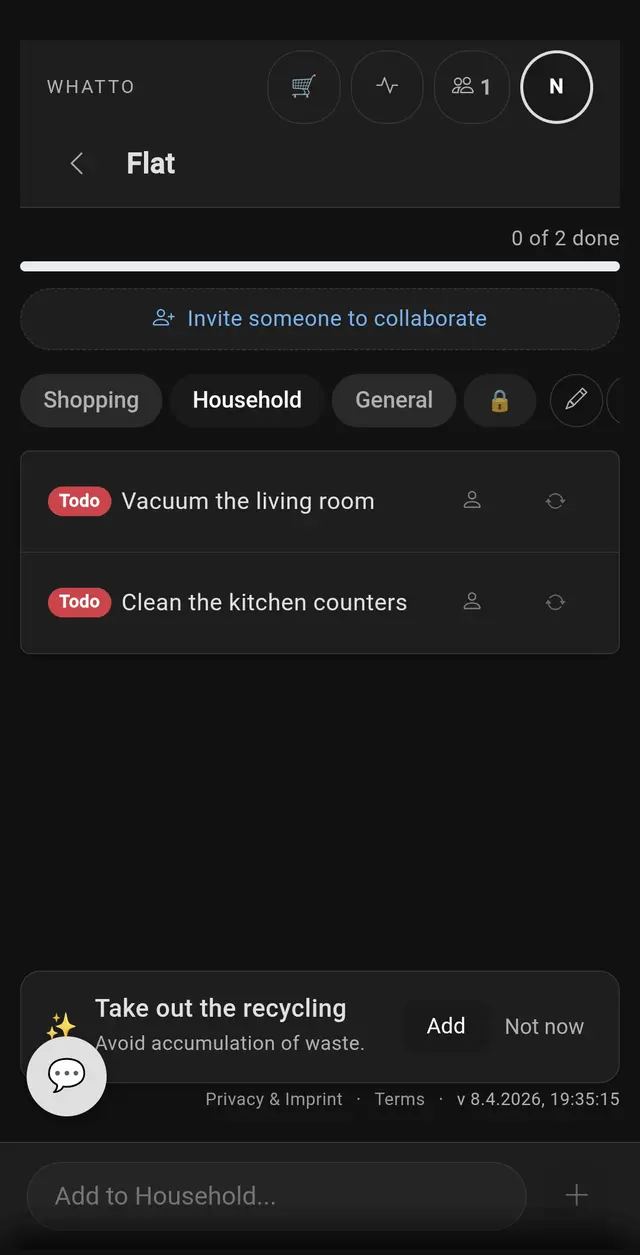
Cleaning task list with vacuum the living room and clean the kitchen counters
Chores done together

Sound familiar?

The bathroom hasn’t been cleaned in two weeks but everyone insists they “did it last time”. Without proof, the argument goes in circles.

You stuck a cleaning rota on the fridge. Two weeks later it’s buried under takeaway menus and nobody follows it anymore.

You tried a shared spreadsheet but updating it feels like admin work. Eventually one person stops logging and the whole system collapses.

WhatTo tracks chores automatically. Recurring tasks reappear when due, contributions are logged per person, and the weekly fairness dashboard settles any “I always do it” debates with data.

Recurring tasks that handle themselves

Set a chore to repeat every 3 days, every week or at any custom interval. When someone checks it off, WhatTo schedules the next occurrence automatically. You don’t need to re-add “vacuum the living room” every Monday — it just shows up when it’s due.

Weekly fairness dashboard

The “This Week” view shows how many tasks each member completed, displayed as visual effort bars. Contributions are tracked even after tasks are deleted from the list, so cleaning up old items doesn’t erase anyone’s work. It’s the end of the “I always clean more than you” argument.

Sections for every room in the house

Organise chores by room — Kitchen, Bathroom, Living Room, Hallway. Each section has its own tasks, so you can focus on one area at a time. This also works well for flatmates who split responsibility by room rather than by task.

Push reminders when tasks are due

WhatTo sends push notifications when recurring chores come back. No need to check the app proactively — your phone reminds you when it’s time to clean. Combine chore tracking with your shared shopping list to manage your whole household in one place.

HOW IT WORKS

How shared chore rotation works

Four steps to a fair cleaning schedule

01
Step 1
Create your room
Name a room for your flat — WG Berlin, House 12. Takes 10 seconds, no app to download.
Web appNo download
02
Step 2
Invite by link or QR
Share the invite link via WhatsApp or show the QR. Everyone joins in seconds — no account needed.
QR codeLink invite
03
Step 3
Set up the rotation
Pick chores, set frequency, assign members. WhatTo handles the rotation automatically.
RecurringAuto-rotation
04
Step 4
Track who did what
A weekly fairness dashboard shows everyone’s contribution at a glance — no more “I always do it”.
FairnessWeekly view

Why not a spreadsheet or a whiteboard?

Spreadsheets need someone to maintain them. Whiteboards get ignored. Paper rotas on the fridge work until someone peels them off or a new flatmate moves in.

WhatTo automates the hard part. Recurring tasks reappear on schedule, push notifications remind the right person, and the fairness dashboard logs who actually did the work — so nobody has to play chore police. It also integrates with your household management and expense tracking.

Frequently Asked Questions

How do I create a cleaning schedule?

Create a room with sections like Kitchen, Bathroom, Living Room. Add recurring tasks and assign them to household members. Each task can have a custom repeat interval so it reappears automatically when due.

Can tasks repeat automatically?

Yes. Set an interval (e.g. every 7 days) and the task reappears automatically when it’s due. Even after someone checks it off, the recurring schedule keeps running so the chore comes back on time.

Can I see who did what?

Yes. The This Week view shows how many tasks each member completed with visual effort bars. It tracks contributions even after items are deleted from the list, so the data survives cleanup.

Does WhatTo work for couples or just flatmates?

WhatTo works for any shared household: couples, flatmates, families or housemates. The free plan supports up to 3 members per room. The Family plan supports up to 10 members.

Do I need to download an app?

No. WhatTo is a Progressive Web App that runs in any modern browser. Add it to your home screen on Android or iOS for push notifications and a native-like experience.

Is there a free plan?

Yes. The free plan includes 2 rooms and 2 sections per room. New users also get a 14-day Premium trial with unlimited rooms, sections and the full activity timeline.

“The weekly fairness bars ended our cleaning arguments overnight. Now everyone can see who did what.”— Anna & Lukas, Hamburg
“Recurring tasks just reappear when they’re due. I never have to re-add ‘clean the bathroom’ — it handles itself.”— Sophie, London
“We tried spreadsheets, whiteboards, even a chore wheel. WhatTo is the first thing that actually stuck.”— Flat 3B, Berlin

Discover more: Shopping List · Household · Flatmates · Receipt Scanner · Holiday