EN DE
WHATTO
buy. plan. organise.

Stop managing your household with WhatsApp groups

WhatTo gives couples, flatmates and families one shared space for shopping, chores and expenses — synced in real time across all devices. No app install needed. 14-day free trial included.

Start free — 14-day trial

Free & no credit card needed. 14 days of Premium included.
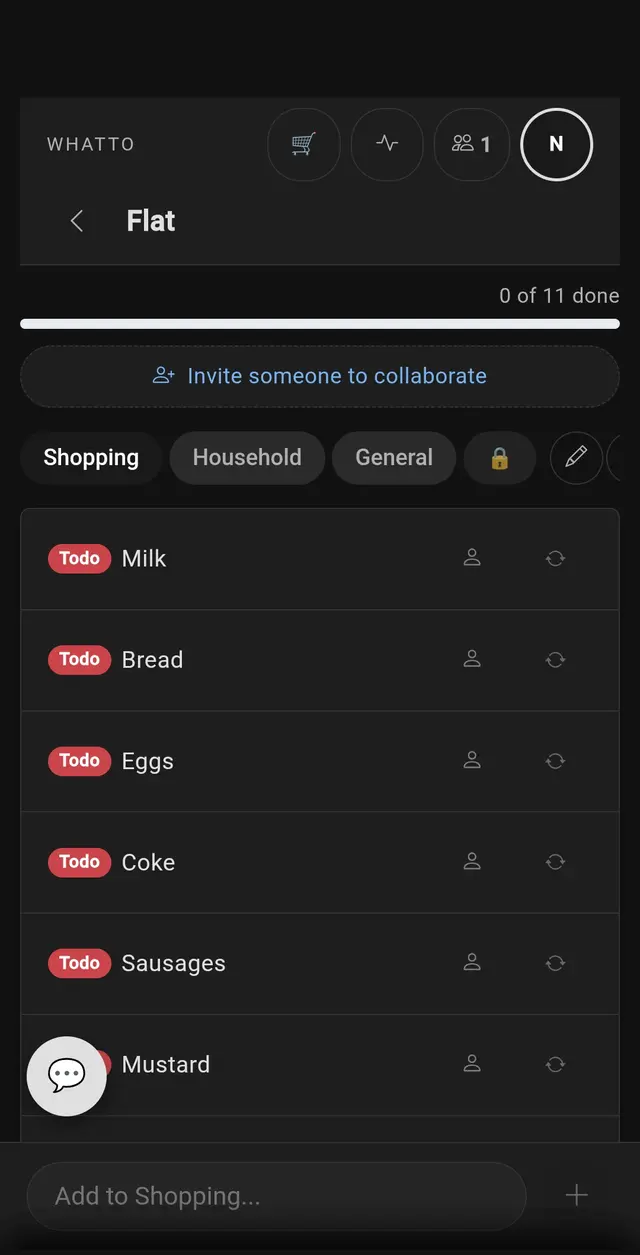
Household shopping list with milk, bread and eggs and a progress bar
Your shared list, in real time

Sound familiar?

Your household “system” is a WhatsApp group with 200 unread messages. The shopping list is buried somewhere between memes and voice notes. Nobody scrolls back far enough to find it.

You split chores verbally but there’s no record. Two weeks later it’s a he-said-she-said argument about who cleaned the bathroom last.

Someone paid for the weekly shop, someone covered the cleaning supplies, and now nobody remembers who owes what. You end up absorbing costs or sending awkward “you owe me £12” messages.

WhatTo replaces the group chat, the fridge notes and the mental spreadsheet with one shared app that everyone actually uses — because it’s faster than texting.

Shared lists that sync in real time

Create lists for groceries, household supplies, gift ideas or anything else. Every item added, checked off or rearranged appears on all devices within a second. No refresh needed, no “check the list” reminders — your household is always on the same page. Organise items into sections for different stores or categories. See our dedicated shopping list page for more.

Cleaning schedules with recurring tasks

Set chores to repeat every few days, weekly or at any custom interval. When someone checks off a task, the next occurrence is scheduled automatically. The weekly fairness dashboard shows who contributed what — with visual effort bars that survive even when old tasks are cleared. More details on our cleaning schedule page.

Receipt scanning and expense splitting

Photograph a receipt and WhatTo’s AI extracts every item with its price and category. Assign items to household members, see balance charts over time, and settle up with a single tap. No spreadsheets, no guesswork, no “I think I paid for that”. Explore the full feature on our receipt scanner page.

AI suggestions that learn your routine

WhatTo’s AI analyses your household patterns and suggests items or tasks you regularly need. The more you use it, the smarter it gets. Building your weekly list takes seconds instead of a group discussion.

Weekly contribution tracking

The “This Week” view shows each member’s completed tasks as visual effort bars. It works across shopping, chores and any other list — giving your household a transparent picture of who’s pulling their weight.

HOW IT WORKS

How household management works

Four steps to a household that runs itself

01
Step 1
Create your room
Name a room for your household — Family, Home. Takes 10 seconds, no app to download.
Web appNo download
02
Step 2
Invite your household
Share the invite link via WhatsApp or show the QR. Everyone joins in seconds — no account needed.
QR codeLink invite
03
Step 3
Plan and organise together
Shared lists, recurring tasks, contribution tracking — all visible to everyone.
Real-timeRecurring
04
Step 4
Track shared expenses
Scan receipts, see where the money goes, split fairly — no more “who paid what?”.
ReceiptsCharts

Why not just use WhatsApp and a notes app?

WhatsApp is great for chatting but terrible for lists. Messages get buried, nobody scrolls back, and you can’t check items off or track who did what. Notes apps sync between your devices but sharing with a household means complicated account setups.

WhatTo is purpose-built for shared households. Real-time sync, Store Mode for live shopping, recurring chores, fairness tracking, receipt scanning, expense splitting — all in one place. It’s not a workaround; it’s the tool the job actually needs. Perfect for flatmates, couples and families alike.

Frequently Asked Questions

Who is WhatTo for?

WhatTo is for anyone sharing a household: couples, flatmates, families, housemates or small teams. If you coordinate shopping, chores or expenses with other people, WhatTo can help.

What can WhatTo do?

Shared shopping lists with real-time sync, cleaning schedules with recurring tasks, receipt scanning with AI item extraction, expense splitting with balance tracking, AI suggestions, push notifications and weekly contribution summaries.

Is there a free trial?

Yes. New users get 14 days of Premium for free with all features included. After that, the free plan gives you 2 rooms and 2 sections per room. Premium starts at €3.99/month.

How is WhatTo different from a to-do app?

Regular to-do apps are designed for individuals. WhatTo is built for shared households: real-time sync between members, Store Mode for live shopping coordination, fairness tracking for chores, and receipt scanning for expense splitting.

Does WhatTo work offline?

Yes. WhatTo stores data locally and syncs when you’re back online. You can view and edit your lists without an internet connection.

Where is my data stored?

WhatTo uses Google Firebase on European servers in Frankfurt, Germany. Your data is never sold to third parties. WhatTo is fully GDPR compliant.

“We replaced a WhatsApp group, a shared Google Doc and a whiteboard — all with one WhatTo room.”— Jens & Katrin, Cologne
“The weekly contribution bars ended our chore arguments. Now it’s all transparent.”— Flat 2A, Munich
“Receipt scanning is magic. Photograph the bill, tap split, done. No more mental maths.”— Laura, Dublin

Discover more: Shopping List · Cleaning Schedule · Flatmates · Receipt Scanner · Holiday